
The words on the wall, out of the set you already built.
No second licence, no second operator, nobody retyping lyrics into a slide deck on Sunday morning. The songs in the set become the slides.
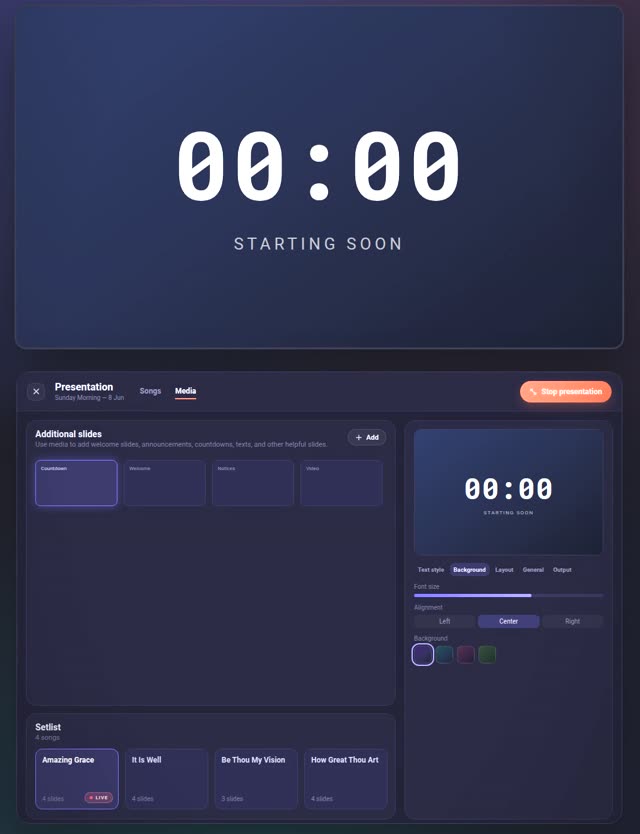
- Top — what the room sees, mirrored on the control screen so you are never guessing.
- Left — slides generated from every song in the set, in set order, with the setlist beneath.
- Right — text style, background, layout, output. And what the live band is currently on.
You do not build a deck. There is no deck.
Every song in the set is already sectioned — verse, chorus, bridge. Presentation reads those sections and lays them out as slides. Change a lyric in the song and the slide changes with it.
- Step 01
Your set, unchanged
The same setlist the band is playing from. Nothing to duplicate, nothing to keep in sync by hand.
- Step 02
Slides appear
One per section, in order. Long sections split at a line limit you set; short songs can share two columns.
- Step 03
Add what is not a song
A countdown before the start, a notice as a PDF, a video, a text slide of your own. They sit in the same rundown.
- Step 04
Send it to the screen
Its own output window, fullscreen on the second display. The control screen stays yours.
Not only lyrics.
The four things a small room needs before and between songs, without opening a second application for any of them.
Countdown
A built-in timer slide. Hide the hours, highlight the last seconds, and the room knows when you start.
Documents and images
Drop in a PDF and every page becomes a slide. Notices, readings, a scanned order of service.
- PNG
- JPG
- WebP
Video
An MP4 as a slide. Loop it, or bounce it forward and back so a short clip fills the gap.
- MP4
Your own text
A slide that is not a song. Written where you are already standing, not in another app.
The band moves on. The screen asks first.
Presentation knows which song the live set is on. When the leader moves, it does not yank the screen out from under you — it says so, and you decide. Set a timeout and it will follow on its own if nobody answers.
This is deliberate. An operator who loses control of their own screen mid-service stops trusting the tool, and a projector that jumps during a prayer is worse than one that lags.
- Live set
- Active
- Live song
- Be Thou My Vision
- Alignment
- Waiting for you
Enough for a small room.
- Lyrics for a congregation or an audience
- A countdown, a notice, a clip between songs
- One person running both the set and the screen
- A laptop and a second display — desktop or the browser
Not production software.
- Multi-layer show control and announcement sequences
- Camera feeds, lower thirds, broadcast output
- Stage displays and confidence monitors
- Phones and tablets — the cockpit needs a real screen
If your church runs cameras and a broadcast, keep the software you have. This is for everyone who was going to buy it and does not need to.
Try it on one rehearsal.
Build one set, open presentation on the laptop that is already there, and put it on the wall. That is usually enough to know.
Open the web app