
Your whole band on the same page — literally.
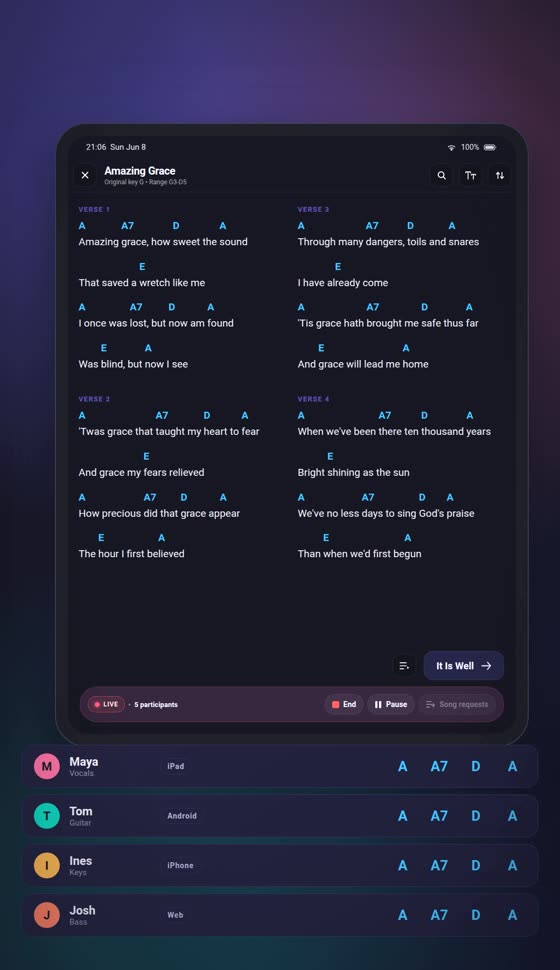
Start a live session and lead the set. Everyone follows on their own device — same song, same section, same key. You transpose, and it transposes for every one of them.
Runs in the browser — nothing to install. No card to start.
- iPhone
- iPad
- Android
- Windows
- macOS
- Linux
- Browser


The planning tools stop when the music starts.
Live sync is the part that keeps going. Nobody shouts the key across the stage, nobody is stuck on last week’s chart.
Transpose for everyone
Change the key once, mid-set. Every follower’s screen changes with it, without a word.
Hand over the lead
Pass leadership mid-set, or let someone ask for it. The session never has to stop.
Requests from the band
A player suggests a song — now, next, or at the end, with a note. You accept or decline.
Live history
Every key change, song swap and handover, timestamped. Useful when someone asks what happened.
Live sessions run inside an organisation. Creating one starts on the Band plan — but everyone you invite joins on Free, at no cost to them.
See how a session runs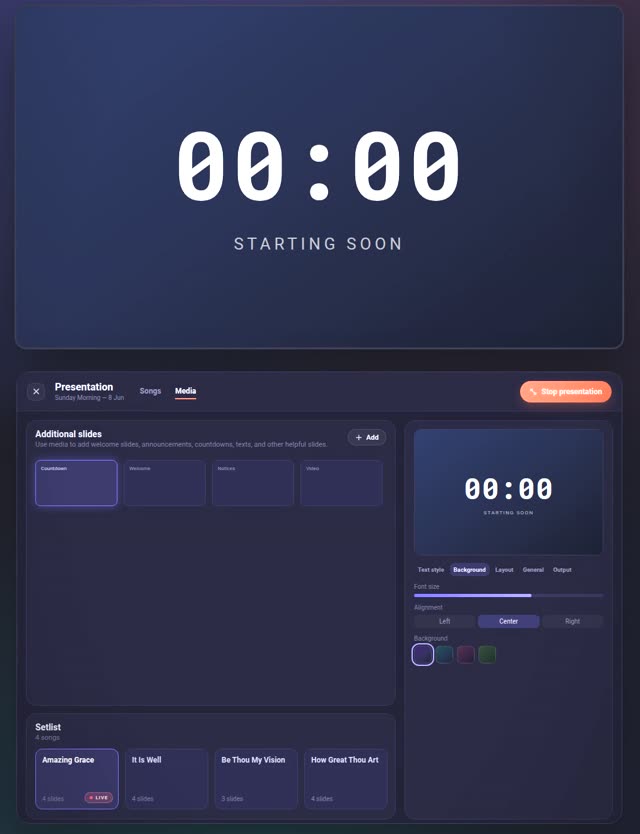
Put the words on the wall. Keep the chords off it.
Slides are built from the songs already in your set — you do not retype a single line into anything. For a small room, this is the whole presentation setup.
Slides from your set
Verse by verse, automatically. Split long sections, or balance a short song across two columns.
More than lyrics
A countdown timer, a PDF, a photo, an MP4 — added as slides alongside the songs.
Backgrounds you keep
Generated, solid, or your own images in a shared library. A new one per song, if you want.
It knows the live set
The band moves on, the screen asks. Following is a decision you make, not something it does behind you.
Presentation runs on desktop and web. It is not production software — no announcement sequences, no multi-layer show control. Lyrics, media and a countdown, driven from the set you already built.
You have 200 songs in PDFs. That is not a reason to stay.
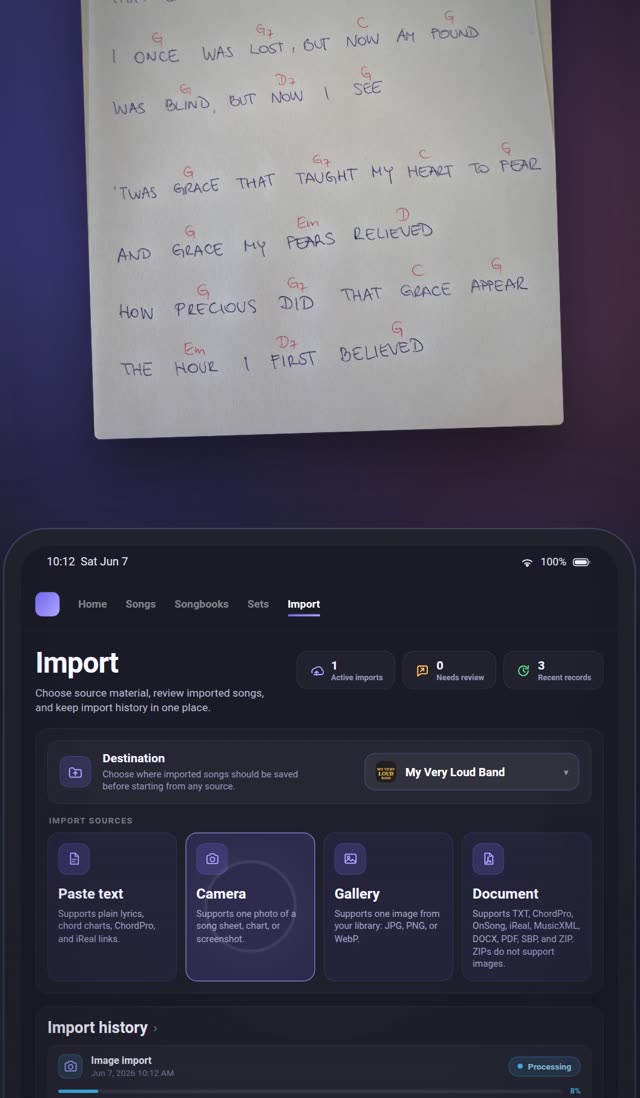
Photograph a handwritten chart. Drop in a folder of PDFs. Paste ChordPro, or an iReal link. Songware reads them and turns them into real, transposable songs.
- Photo & scan
- .docx
- Plain text
- ChordPro
- OnSong
- MusicXML
- iReal link
- .sbp
- ZIP of a whole folder
Structured formats are free, on every plan
ChordPro, iReal, MusicXML and .sbp files are parsed on our side without AI. Unlimited, including Free.
Photos, PDFs and Word files go through AI
Fifteen to sixty seconds a file, and it tells you how confident it is. Expect to fix a chord, not to retype a song. Bulk ZIP import starts at Band.
The workspace the set comes out of.
The three above are why teams switch. These are why they stay.
Songbooks
Themed collections with photo or gradient covers.
Sets with a plan
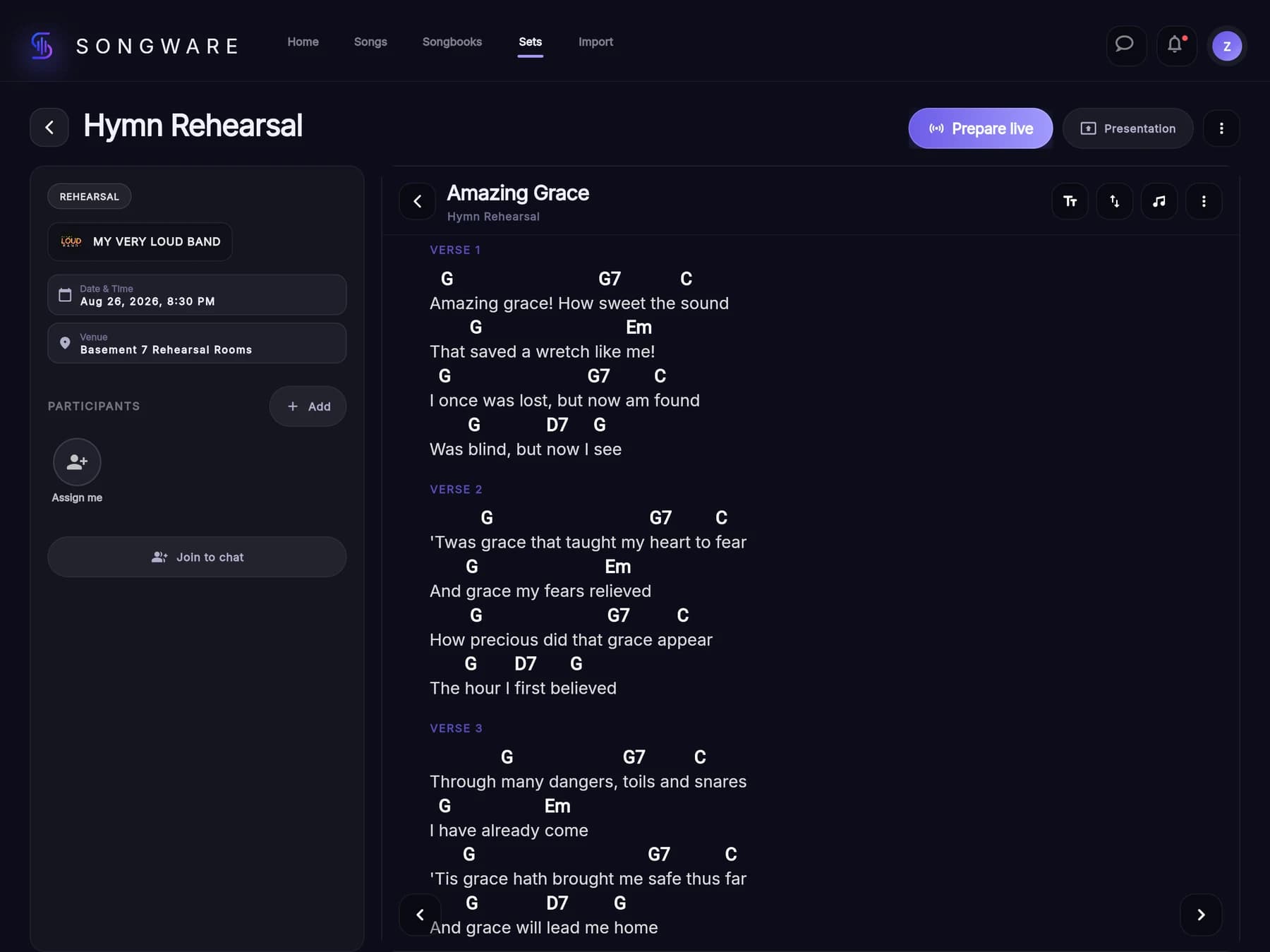
Date, time, venue, type and the people who are playing.
Organisations
Members with per-permission control over songs, sets and invites.
Audio takes
Record straight onto a song, trim on the waveform, keep ten per song.
Chat on the set
Attach a song, a songbook or a whole set to the message.
The song editor
Tap a word, drop a chord. Or type [G] inline if you are faster that way.
Keys, capo, range
Original key, vocal range and capo held per song, per player.
Search that forgives
Diacritics ignored — cao finds ćao.
Your repertoire is seen by your team. Nobody else.
Songs, translations, arrangements and setlists stay inside the organisation that made them. No public profiles, no global lists, nothing published outside your band. Songware is a tool for your own charts — never a catalogue of anyone else’s.
Free for playing alone. Paid when you bring the band.
Only the person who runs the band pays. Everyone they invite plays for free, on any plan.
Free
€0foreverA small collection of your own — and full access to any band that invites you in.
- 50 songs · 10 songbooks · 5 sets
- Unlimited ChordPro, iReal, MusicXML and .sbp import
- 3 AI imports a month
- Transpose, capo, tags, search
- Join unlimited organisations as a member
Band
Most teams€5.99/ monthor €59.90 a year — two months freeOne band, worship team or class. You pay, ten people play — and live sync turns on.
- Everything in Free, without the limits
- Your own organisation — 10 members, free for them
- Live sessions, setlist participants, presentation
- 30 personal + 100 band AI imports a month
- ZIP bulk import of a whole folder
- 5 GB personal + 25 GB band audio takes
Band+
€9.99/ monthor €99.90 a year — two months freeMore than one group: a school, a church with several teams, a director juggling projects.
- Everything in Band
- Up to 10 organisations, 30 members each
- 30 personal + 300 shared band AI imports a month
- 100 GB shared band audio storage
- Priority email support
OnSong is excellent — if your whole band has an iPhone.
| Songware | Planning Center | OnSong | BandHelper | WorshipTools | |
|---|---|---|---|---|---|
| Android | Yes | Yes | No | Yes | Yes |
| Windows · macOS · Linux | Yes | No | No | No | Presenter only |
| Transposes the whole team at once | Yes | Per player | Per player | Partly | On Pro |
| Lyrics on a second screen | Yes | No | No | No | Presenter only |
Competitor features re-checked September 7, 2026. Tell us if something here is out of date and we will fix it.
Free on every platform. Nothing for the band to install.
The iPhone, iPad and Android apps are free on the stores, the desktop builds are a direct download, and the same app runs in any browser — which is how the people you invite follow a live set: from a link, on whatever they brought.
- Free to install
- No card to start
- One account, every device
Or skip the install. The browser build is the whole product, and it is what the desk and the projector run today.
- iPhone & iPadOn the App StoreDownload on the App Store
- AndroidOn Google PlayGet it on Google Play
- macOSOut nowDownload for macOS
- WindowsOut nowDownload for Windows
- LinuxOut nowDownload the AppImage
- BrowserWorks todayOpen the web app
The desktop builds are direct downloads, no store in between. Windows comes as an installer or a portable .zip, Linux as an AppImage or a .deb, both for 64-bit Intel and AMD machines. On anything else — an ARM laptop, a Raspberry Pi — the browser is the build.
Downloads for your deviceWhat bands actually ask.
Does my band have to learn a new tool?
No. You send a link, they open the set and follow. All they do is watch — you lead.
Do I pay for every member?
No. The person who owns the band pays; everyone invited into it uses the band’s library for free, whatever plan they are on themselves.
What happens to my songs if I stop paying?
Nothing is deleted. Your library stays visible and readable; team editing pauses until the plan is active again, and picks up exactly where it left off.
Is our repertoire visible to other users?
No. There are no public profiles, no shared setlists and no global song lists. What your team writes stays inside your team.
Can I try a live session on the Free plan?
Only inside a band somebody else already pays for — live sessions run in an organisation, and creating one starts at Band. If a friend invites you into theirs, you get the whole thing at no cost.
Is the price on this page the final price?
It is the base price. Your country’s VAT goes on top, so the total depends on where you are. A subscription is started inside the iOS or Android app, and checkout always shows the real total first.
Which devices does it run on?
The web app runs in any modern browser today — nothing to install. The iPhone and iPad app is on the App Store and the Android app is on Google Play, both free to download. Windows, macOS and Linux are direct downloads from the download page.
Can I bring songs I already have?
Yes. Import from photos, PDFs, Word documents, ChordPro, MusicXML, iReal links, or a ZIP of a whole folder. ChordPro, iReal, MusicXML and .sbp are parsed directly; photos, scans, PDFs and Word files go through AI with a confidence score so you know what to check.