Import

Two hundred songs in PDFs is not a reason to stay where you are.

Photograph the handwritten chart. Drop in the folder. Paste the ChordPro. Songware turns each one into a real song — chords over the right syllables, sections marked, transposable — and tells you how sure it is.

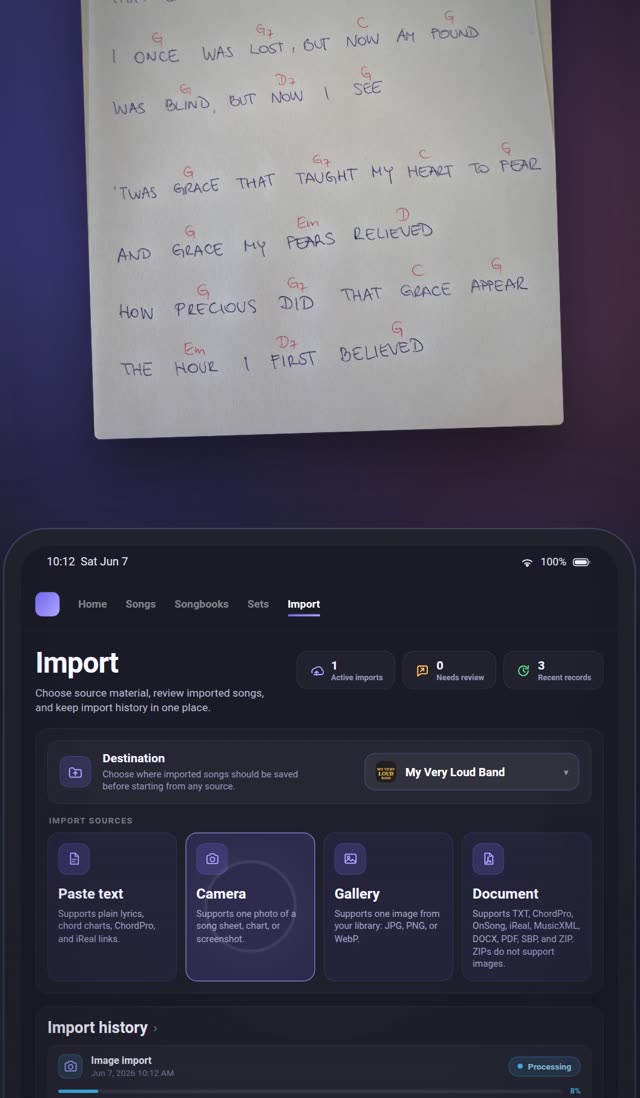
A handwritten chord sheet being photographed, and the same song arriving in the Songware import workspace
Two roads in

A file that knows its chords is parsed. A picture of one is read.

Which road an import takes decides how long it waits, whether it counts against a plan, and whether there is anything to check afterwards. You do not choose — the app does, from the file.

Parsed on the spot

Structured files are read, not interpreted.

A format that already knows where its chords are is decoded by a parser — no AI, no waiting, no guesswork about what a smudge was.

Takes
Under a second
Costs
Unlimited on every plan, including Free
  • ChordPro.cho, .chordpro, .chopro, .crd, .pro
  • iReal Pro.ireal or .irealbook files, or a pasted irealb:// link
  • MusicXML.musicxml, .xml, and compressed .mxl
  • Songbook Pro.sbp — a whole collection export becomes one song per entry
Read by AI

Everything else is a picture of a song.

A photo, a scan, a PDF, a Word file or a block of pasted text has no structure a parser can use. Those go to an AI model that reads the page and writes it back as a Songware song — with a confidence score attached.

Takes
5–20 seconds for text, 15–60 for a photo or a scan
Costs
Counts against the plan’s monthly AI imports
  • Photo or screenshotJPG, PNG, WebP — from the camera or the library, up to 5 MB
  • PDFTyped PDFs are read as text; scanned ones as images. Up to 10 MB and 20 pages
  • Pasted textChords over lyrics, OnSong-style headings, ChordPro, or bare lyrics
  • OnSong, Word and plain text.onsong, .docx, .txt
How an import runs

Four steps, and the app does the third one.

The import workspace is one screen: where the songs go, what they come from, what is running, and what came out of it.

  1. Step 01

    Pick where it goes

    Your own songs, or one of your organisations. Choose once and every source starts straight into that destination.

  2. Step 02

    Pick a source

    Paste text, take a photo, choose a picture, or open a document — a ZIP of a whole folder counts as one. The app works out which road it takes.

  3. Step 03

    It runs in the background

    The import is queued and you keep using the app. Up to five can run at once, and the progress card tells you where each one is.

  4. Step 04

    Songs land, flagged if unsure

    Imported songs go straight into the library as normal songs. Anything the AI was less than 90% sure about carries a review badge until you open it.

The review

Songs land first. Checking comes after.

An imported song is a normal song the moment it arrives — in a set, on a screen, transposed. What the AI was unsure about is flagged, not held back.

A parsed file never carries a score: there was nothing to be unsure about. Only the AI road does.

Import results · Sunday folder
  • Amazing GraceAI confidence 96%Reviewed
  • Be Thou My VisionAI confidence 91%Reviewed
  • How Great Thou ArtAI confidence 82%Review
  • It Is WellAI confidence 71%Review
Flagged when
The confidence is under 90%, or the model left a note about something it could not make out.
Cleared when
You open the song and save it, or mark it reviewed from the results list. The badge on the song tile goes with it.
Kept where
Import history lists every run — what came in, how many songs, which failed — with retry for what did.
What comes out

A song, not a scan.

The point of importing rather than attaching a PDF: the result is something the rest of the app can work with.

A whole folder

Zip it and hand it over.

The way a band with years of charts actually moves: one archive, one import, one results list. From the Band plan.

  • One ZIP, one import

    Up to 100 files and 50 MB. Each file becomes its own item with its own status, so one bad file does not sink the other ninety-nine.

  • Skipped files are listed

    Anything the ZIP held that could not be processed is shown by name. Mac clutter like __MACOSX is dropped silently.

  • Retry only what failed

    A partial import retries its failed items and leaves the songs that worked alone.

  • Not images

    A ZIP of photos is refused, because there is no reliable way to tell which pictures belong to which song. Photograph songs one at a time instead.

Worth knowing first

What it will not do, so you are not surprised.

  • A PDF longer than 20 pages is not rejected — the first 20 pages are imported and the rest are dropped.
  • Pasting text always takes the AI road, even ChordPro. Upload the same content as a .cho file and it is parsed for free.
  • Guitar tablature, repeat marks (||:, D.C. al fine) and dynamics are not part of the song format and do not survive an import.
  • iReal Pro carries no lyrics, so an iReal import is chords only.
  • Nothing checks for duplicates. Import the same song twice and you have it twice.
  • A structured file that fails to decode will fail the same way on retry — the fix is re-exporting it from the app it came from.
  • How well a handwritten chart comes through depends on the handwriting and the photo. The confidence score is there so you know which ones to look at.
Per plan

Parsing is free. Reading costs, and is metered.

  • ChordPro, iReal, MusicXML, .sbp

    Free
    Unlimited
    Band
    Unlimited
    Band+
    Unlimited
  • AI imports, personal

    Free
    3 a month
    Band
    30 a month
    Band+
    30 a month
  • AI imports, band pool

    Free
    Not included
    Band
    100 a month
    Band+
    300 a month, shared across your organisations
  • ZIP bulk import

    Free
    Not included
    Band
    Yes
    Band+
    Yes

The limit follows the owner of the library, not the person importing. A bandmate on Free importing into your organisation draws on your band pool, not on their three. Prices, and what they come to after tax, are on the pricing page.

Try it on the worst chart you own.

Free comes with three AI imports a month. Photograph the one that has been photocopied since 1998 and see what comes back.

Open the web app